Get answers from our community of experts in record time.
Join now- Technical Forums
- :
- Dashboard & Administration
- :
- Re: New Firmware Lifecycle Terminology coming to the Meraki dashboard
New Firmware Lifecycle Terminology coming to the Meraki dashboard
- Subscribe to RSS Feed
- Mark Topic as New
- Mark Topic as Read
- Float this Topic for Current User
- Bookmark
- Subscribe
- Mute
- Printer Friendly Page


- Mark as New
- Bookmark
- Subscribe
- Mute
- Subscribe to RSS Feed
- Permalink
- Report Inappropriate Content
New Firmware Lifecycle Terminology coming to the Meraki dashboard
We’re sharing an early preview into an upcoming improvement to how firmware stages are labeled in the Meraki dashboard.
Beginning February 2026, you’ll see new firmware lifecycle terminology designed to make new builds clearer and aligned to broader Cisco software naming standards.
Note: No functional changes are being introduced, this is a terminology update only.
For early reference, visit our documentation on managing firmware upgrades.
What’s new?
New firmware stage terminology
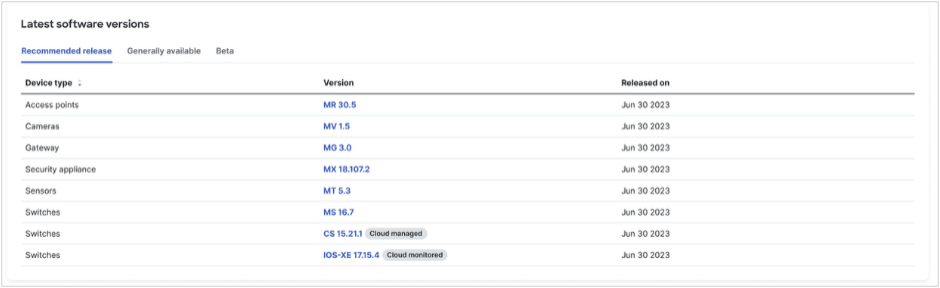
Starting February 2026, there will be 3 new firmware stages that replace the previous naming:
- Recommended Release (previously “Stable”)
- Generally Available (previously “Stable Release Candidate” or other available versions)
- Beta (no change from “Beta”)
Key updates
- 🏷️ Legacy labels consolidation: Existing labels will be consolidated into the new firmware stages. E.g. “Stable RC” label will be merged into the General Available category, and “Stable” label will be merged into the Recommended Release category.
- 🌟 Clarity across naming: Plan and schedule upgrades with clearer guidance around firmware naming, now being standardized across Cisco software stages.
- ✅ No impact to existing workflows: No functionality is being removed, and no impact to existing templates or settings. If you’re using Meraki APIs, you’ll receive a separate notice prior to the removal of any legacy APIs.
Firmware use cases
- Recommended Release: Best for mission-critical production networks, has the broadest customer adoption and is the default for new networks.
- Generally Available: Ideal for production environments that want a balance of stability and new release features.
- Beta: Suitable for lab testing, pilots, and bug-fix validation, for early and frequent evaluation of new features before wider deployment.
Managing firmware
To manage firmware or schedule firmware upgrades:
- Log in to your Meraki dashboard
- From the left-hand navigation > select Organization > Monitor > Firmware Upgrades
- Beginning February 2026, you’ll see the 3 new firmware stages under Latest software versions
Timing
This is a pre-announcement and no action is required at this time.
Updated firmware terminology will begin rolling out to all Meraki dashboard organizations starting February 2026.
Stay tuned for more updates and documentation as we get closer to rollout.
Cisco Meraki Product Marketing
- Labels:
-
Administrators
-
Firmware upgrades


- Mark as New
- Bookmark
- Subscribe
- Mute
- Subscribe to RSS Feed
- Permalink
- Report Inappropriate Content
Please, please, please don’t start labelling firmware as Everest, Denali, Fuji etc as we see with legacy cisco IOS trains.
https://www.linkedin.com/in/darrenoconnor/
I'm not an employee of Cisco/Meraki. My posts are based on Meraki best practice and what has worked for me in the field.

- Mark as New
- Bookmark
- Subscribe
- Mute
- Subscribe to RSS Feed
- Permalink
- Report Inappropriate Content
Where is the "no cudo" button? I don´t like the new Cisco views. I want my Meraki views back. 😭

- Mark as New
- Bookmark
- Subscribe
- Mute
- Subscribe to RSS Feed
- Permalink
- Report Inappropriate Content
Will the dashboard be changed so you can make sure auto updates only use recommended releases? At the moment you can specify whether you want beta releases, but now that we are moving to the Catalyst labelling we will be asked to make sure only recommended releases are installed...

-
Administrators
238 -
Change log
15 -
Firmware upgrades
31 -
Inventory
48 -
Licensing
79 -
Meraki mobile app
12 -
Other
176
