We're migrating to the Cisco Community on March 31. The Meraki Community will enter read-only mode starting on March 26 through March 31.
Learn more- Technical Forums
- :
- Switching
- :
- Re: Connection FW - SW - AP Meraki - Trunk o Access?
Connection FW - SW - AP Meraki - Trunk o Access?
- Subscribe to RSS Feed
- Mark Topic as New
- Mark Topic as Read
- Float this Topic for Current User
- Bookmark
- Subscribe
- Mute
- Printer Friendly Page

- Mark as New
- Bookmark
- Subscribe
- Mute
- Subscribe to RSS Feed
- Permalink
- Report Inappropriate Content
Connection FW - SW - AP Meraki - Trunk o Access?
Hi Team
I'm reaching out to your expertise again. I have an unusual case, and I'm not sure if I'm doing something wrong or if I'm missing something.
My topology is simple: ISP <--MX <--MS <--MR
2 MX-67 devices
1 MS120-8P switch
2 MR36 access points (1 per mesh)
The connection on the MS120 is a breakout connection to the two MX devices.
I have one separate VLAN for internet traffic (VLAN 100) (no DHCP)
I have one management VLAN (VLAN 50) (no DHCP)
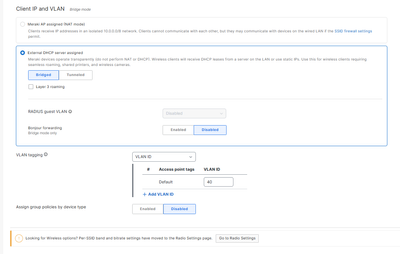
I have one VLAN for the SSID (VLAN 40) (with DHCP) on the firewall.
The problem is that when I put the access point in the trunk on native VLAN 50 (because it's the management network) and assign it a static IP address, it switches to DHCP mode on VLAN 40 and gets an IP address from that segment. The strange thing is that if I leave it on native VLAN 1, it doesn't get an IP address. It works, as shown in the image.
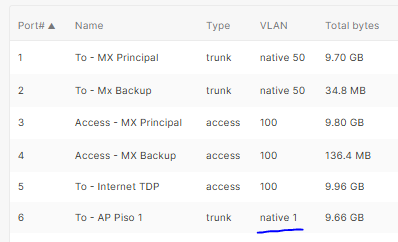
This is what I have applied in the firmware on that port.
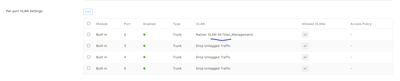
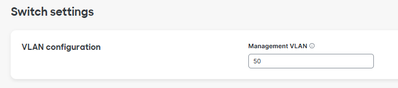
This is the configuration I changed in the switch management; it was set to VLAN 1, and I changed it to VLAN 50.
This is configuration with SSID
I would appreciate it if you could let me know if I'm doing something wrong in the configuration.
- Labels:
-
Interfaces
-
Layer 2
-
Layer 3


- Mark as New
- Bookmark
- Subscribe
- Mute
- Subscribe to RSS Feed
- Permalink
- Report Inappropriate Content
The management VLAN setting under switches is for Switches Only. APs management VLAN is specified either by the native vlan on the trunk OR by setting it in the IP Settings of the AP (works both static and DHCP).

If the native vlan you provide the AP doesn't have DHCP it will try to source an IP from any other VLAN it can see. If you set a static IP in another VLAN once it gets online once it will get it's config and switch to the static IP.
While I generally recommend APs have DHCP for management if you must use static IPs, I'd setup a small pool on the VLAN to allow new devices to get online and then get their static configuration. Failing that you can put them on a native VLAN that provides DHCP and then allow them to switch their management to your VLAN 50 once they download the config.
- Mark as New
- Bookmark
- Subscribe
- Mute
- Subscribe to RSS Feed
- Permalink
- Report Inappropriate Content
Hi @Mloraditch
I understand the VLAN management for the switches.
Regarding the access points, they do have static IPs (screenshot attached), but the switch port is on native VLAN 1. Shouldn't it be native VLAN 50? My network is on VLAN 50 (192.168.50.x).
Is that a correct configuration?

- Mark as New
- Bookmark
- Subscribe
- Mute
- Subscribe to RSS Feed
- Permalink
- Report Inappropriate Content
What you have will work. You can either have them native on any vlan but 50 with 50 specified in the ip settings like you have or you can make 50 the native vlan and then you leave the vlan field blank in the ip settings
- Mark as New
- Bookmark
- Subscribe
- Mute
- Subscribe to RSS Feed
- Permalink
- Report Inappropriate Content
So that's expected behavior; when I configured Catalyst switches it was different, that's why I was confused.


- Mark as New
- Bookmark
- Subscribe
- Mute
- Subscribe to RSS Feed
- Permalink
- Report Inappropriate Content
Hi @Carlos1 ,
As you haved Tagged the SSID with VLAN 40. You'll need to set the Switch port (connectd to the AP) as Trunk. As more than one VLAN is expected to Ingress and Egress. Also as you have Tagged the AP with VLAN 50. The Switch port cannot be Native VLAN 50. Because it is expecting a Layer 2 frame with no VLAN_ID. As such, the switch will then assign a VLAN_ID of 50 to that frame.
Cheers,
Ivan Jukić,
Meraki APJC
If you found this post helpful, please give it kudos. If it solved your problem, click "accept as solution" so that others can benefit from it.
- Mark as New
- Bookmark
- Subscribe
- Mute
- Subscribe to RSS Feed
- Permalink
- Report Inappropriate Content
So this is normal behavior as configured on the switch?
I mention this because on Catalyst 9200 switches I've configured a port where a Meraki AP connects like this:
interface g1/0/20
Switch port mode trunk
Switch port trunk native vlan DD
Switch port trunk allowed vlan 10, 20, 30, 40 (WiFi network VLANs)
Where vlan DD is the management VLAN for the devices.
I was thinking of replicating this on a Meraki switch, considering the native VLAN as the management VLAN, but I think a Catalyst switch doesn't work the same way as a Meraki.
So, to conclude the discussion, I should configure the Meraki switch port in:
Trunk Mode
Native vlan 1
Allowed vlan XX, YY, ZZ
Correct?

- Mark as New
- Bookmark
- Subscribe
- Mute
- Subscribe to RSS Feed
- Permalink
- Report Inappropriate Content
Yes. It normal, expected behavior on any switch. Native VLAN mismatches will cause problems with DHCP and general communications. See below best practice guide.
Cheers,
Ivan Jukić,
Meraki APJC
If you found this post helpful, please give it kudos. If it solved your problem, click "accept as solution" so that others can benefit from it.

