Get answers from our community of experts in record time.
Join now- Technical Forums
- :
- Wireless
- :
- Re: MR46s and Intel Wifi Cards - disconnects - any settings we should explo...
MR46s and Intel Wifi Cards - disconnects - any settings we should explore from a Meraki POV?
- Subscribe to RSS Feed
- Mark Topic as New
- Mark Topic as Read
- Float this Topic for Current User
- Bookmark
- Subscribe
- Mute
- Printer Friendly Page

- Mark as New
- Bookmark
- Subscribe
- Mute
- Subscribe to RSS Feed
- Permalink
- Report Inappropriate Content
MR46s and Intel Wifi Cards - disconnects - any settings we should explore from a Meraki POV?
Hi all,
We’re running a ~200 person office with an average daily headcount of around 120. Nearly all users have company provided Dell laptops with Intel AX211 WiFi cards (95%+), and we're seeing ongoing WiFi instability across the board.
The issue:
Users frequently report momentary WiFi dropouts – disconnects lasting a few seconds before reconnecting. In Event Viewer, this typically shows a burst of events, then everything appears to recover on its own.
Key context:
All laptops are company-provided and Intune-managed.
Driver version across the fleet is Intel 23.131.0.
OS mix: Mostly Windows 11, with a few Windows 10.
Our SSID is 5GHz-only (we removed 2.4GHz recently, but the issue existed before that too).
PSK (WPA3-SAE Transition Mode)
802.11r Enabled
802.11w Enabled
MRs are on latest firmware
Non-company devices (eg when users BYOD) do not have this issue, suggesting it's specific to the build or hardware config.
Common recurring Event IDs:
7021 (most frequent)
6062
Some have suggested tweaking Device Manager > Advanced Settings (e.g. disabling power saving, LRO, lowering roaming aggressiveness), but we've not seen definitive improvement yet.
Has anyone seen similar behavior with Intel AX211 or AX2xx series cards and meraki equipment?
Some Meraki Screenshots and event IDs
I know it looks like the event IDs signify driver / firmware issues - but they are on the latest release n-1
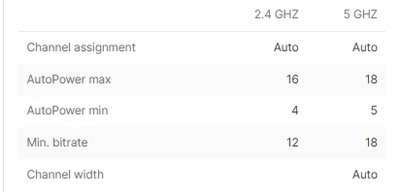
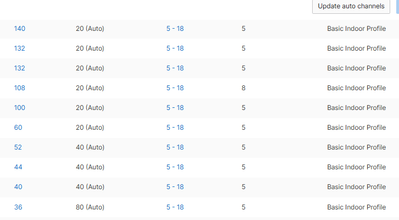
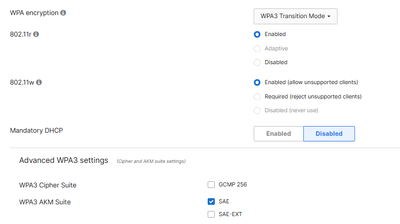


Thanks in advance!
- Labels:
-
Interference
-
RF Spectrum


- Mark as New
- Bookmark
- Subscribe
- Mute
- Subscribe to RSS Feed
- Permalink
- Report Inappropriate Content
Hi ,
What Authentification are you using ? WPA2-PSK ? WPA2-Enterprise ?
- Mark as New
- Bookmark
- Subscribe
- Mute
- Subscribe to RSS Feed
- Permalink
- Report Inappropriate Content
PSK (WPA3-SAE Transition Mode)
802.11r Enabled
802.11w Enabled

- Mark as New
- Bookmark
- Subscribe
- Mute
- Subscribe to RSS Feed
- Permalink
- Report Inappropriate Content
Don't use WPA3-SAE. It works poorly.
- Mark as New
- Bookmark
- Subscribe
- Mute
- Subscribe to RSS Feed
- Permalink
- Report Inappropriate Content
Hello ,
That is interesting , So we have a requirement to be on WPA3 , however i have not tried setting it to WPA3 only without SAE.
i presume just WPA3 will be ok ? - eg below?

I cant recall us setting SAE explicitly , but perhaps it was auto enabled when we set it to WPA3-Transition mode.
- Mark as New
- Bookmark
- Subscribe
- Mute
- Subscribe to RSS Feed
- Permalink
- Report Inappropriate Content
WPA3 works fine, but you need all Wi-Fi 6 clients.

- Mark as New
- Bookmark
- Subscribe
- Mute
- Subscribe to RSS Feed
- Permalink
- Report Inappropriate Content
As @PhilipDAth said WPA3-transition mode is a bag of spanners. WPA3 only does work, but for me it is reliable on HP/Dell Windows 10/11 laptops and Macs, but not so much on Samsung phones. With the Samsung phone you have to turn off Wi-Fi and then back on every few days...
- Mark as New
- Bookmark
- Subscribe
- Mute
- Subscribe to RSS Feed
- Permalink
- Report Inappropriate Content
Thansk CMR,
the phones we can live with , its more so getting the Laptops as stable as we can .
If possible could you send a screenshot of a example config of WPA3 you have that is working reliably with your HP/Dells?

- Mark as New
- Bookmark
- Subscribe
- Mute
- Subscribe to RSS Feed
- Permalink
- Report Inappropriate Content
Hello
So i wasnt able to set it to WPA3 without selecting SAE or SAE-EXT as it needs a specified AKM suite.
Wifi 6 clients is fine , all our corp devices are compatible.
would you have a screenshot of the settings where its just WPA3 without SAE ? as i dont think its possible in the release im on
or did i miss understand and it was to use WPA3-SAE rather than WPA3 Transition SAE?

thanks!
- Mark as New
- Bookmark
- Subscribe
- Mute
- Subscribe to RSS Feed
- Permalink
- Report Inappropriate Content
Sorry, I meant don't use WPA3 Transition Mode.

Interestingly, I don't get as many options as you.

- Mark as New
- Bookmark
- Subscribe
- Mute
- Subscribe to RSS Feed
- Permalink
- Report Inappropriate Content
Thanks
Just a update for all,
Created a new test SSID - Set it to WPA2 Only , Setting Client side config to low aggressiveness, setting wireless mode on client to 802.11ax , and ensuring LRO / Throughput / u-apsd is disabled
= Stable on devices , including users who are testing that frequently had issues.
I am waiting when i can test again with WPA3-SAE rather than WPA3-SAE-Transition mode.
but so far we seem to be on the right track, at least with WPA2 with client side optimisation it is behaving correctly.

- Mark as New
- Bookmark
- Subscribe
- Mute
- Subscribe to RSS Feed
- Permalink
- Report Inappropriate Content
Did anything changed when using WPA3 Only? Or you still having the issue?
We are having the same disconnections for a while and we are looking if there is any official documentation or support case from Intel. So far, we have seen on the different forums people experiencing the same disconnections but seems no official support have shared anything relevant or pass the ball to Meraki, ISP, etc.

- Mark as New
- Bookmark
- Subscribe
- Mute
- Subscribe to RSS Feed
- Permalink
- Report Inappropriate Content
There are multiple reports of WiFi instability with Intel AX211 cards in environments using Meraki access points. You can try disabling 802.11r, Client Balancing, 802.11w and force 5GHz band in the NIC settings, set roaming aggressiveness to low, disable LRO (Large Receive Offload) in the NIC advanced settings.
Please, if this post was useful, leave your kudos and mark it as solved.
- Mark as New
- Bookmark
- Subscribe
- Mute
- Subscribe to RSS Feed
- Permalink
- Report Inappropriate Content
Thanks
Currently we have
802.11r Enabled
802.11w Enabled
Client balancing has been disabled for a long time , we had so many problems with that when we used to have a mixed 2.4/5ghz environment.
I see a option to Disable 802.11r , but for 802.11w i can only Set it to Enabled or required?
Yes will look at roaming aggressiveness and Disabling LRO in the Windows - Intel Driver NIC Settings
was hoping someone has had this exact same problem before and had a nice script for Client side tweaking 😄
- Mark as New
- Bookmark
- Subscribe
- Mute
- Subscribe to RSS Feed
- Permalink
- Report Inappropriate Content
Don't use the Dell-provided driver. Go directly to Intel and download the driver from there.
- Mark as New
- Bookmark
- Subscribe
- Mute
- Subscribe to RSS Feed
- Permalink
- Report Inappropriate Content
Yes we are using Intel provided drivers , the Dell OEM ones are very slow to be released .

- Mark as New
- Bookmark
- Subscribe
- Mute
- Subscribe to RSS Feed
- Permalink
- Report Inappropriate Content
I am facing a similar issue due to bad client roaming between the AP and the Radio. Can you check the Client page --> roaming --> Bad Roaming to see how long it took to roam between the APs?
The window driver settings
Latest driver download.
https://www.intel.com/content/www/us/en/products/sku/204837/intel-wifi-6e-ax211-gig/downloads.html
- Mark as New
- Bookmark
- Subscribe
- Mute
- Subscribe to RSS Feed
- Permalink
- Report Inappropriate Content
Hello
roaming between APs for us is OK , average less than 40ms
- Mark as New
- Bookmark
- Subscribe
- Mute
- Subscribe to RSS Feed
- Permalink
- Report Inappropriate Content
Hi, i have similar issue currently using Lenovo ThinkPad with Inter Wi-Fi 6E 2X211 160Mz WiFi card.
Wifi keep jumping here and there, what is your solution on this ?
As i have made alot of changes includeing power, rf channel, disable 2.4. Even im sitting at one place, device connectivity jumping here and there.

- Mark as New
- Bookmark
- Subscribe
- Mute
- Subscribe to RSS Feed
- Permalink
- Report Inappropriate Content
If your NIC properties on your machine, adjust the "Roaming Agressiveness" setting.
- Mark as New
- Bookmark
- Subscribe
- Mute
- Subscribe to RSS Feed
- Permalink
- Report Inappropriate Content
I already tried from Low to High. My device still keep roaming here and there. There is one point it connecting to the farthest AP in my office 🤣 .
- Mark as New
- Bookmark
- Subscribe
- Mute
- Subscribe to RSS Feed
- Permalink
- Report Inappropriate Content
Can you check the interference level of APs? What is the channel width (Auto or manual)? How is roaming occurring between the APs or between the same radio on the same AP?

- Mark as New
- Bookmark
- Subscribe
- Mute
- Subscribe to RSS Feed
- Permalink
- Report Inappropriate Content
Hi, sorry for the late reply. All APs are set Auto.
- Mark as New
- Bookmark
- Subscribe
- Mute
- Subscribe to RSS Feed
- Permalink
- Report Inappropriate Content
Still having issues?
- Mark as New
- Bookmark
- Subscribe
- Mute
- Subscribe to RSS Feed
- Permalink
- Report Inappropriate Content
I think the issue is not on the Meraki itself, but our device. We tested variety of device such as HP, Mac, Dell and Lenovo. We are using Lenova Thinkpad T16 with AX211 WiFi card, all device not jumping here and there, only Lenovo having this issue. We have contact our local Lenova support, they said "well known issue" but there is no solution for this.

- Mark as New
- Bookmark
- Subscribe
- Mute
- Subscribe to RSS Feed
- Permalink
- Report Inappropriate Content
Having this exact same issue, from ver31.1.7 and recent upgrade of firmware to 31.1.8 the problem of sporadic, intermittent disconnects and poor performance for some devices.
Set aggressiveness and 5GHz as predefined, but affecting some at random.
Have favored the WIN11 driver as default, seems to make a slight difference.
Again, little in the event log, and little in the event log on the AP or on the Meraki portal.
- Mark as New
- Bookmark
- Subscribe
- Mute
- Subscribe to RSS Feed
- Permalink
- Report Inappropriate Content
Hi, we are having the same issue across different HP laptops models with different Wireless Cards, but at the end WiFi 6 AX 200 series family. We have tried different driver versions vendor ones and Intel ones and seems issue still happens random disconnections.
Do you have news, other than changing WPA3 only to WPA2 which seems to improve the stability?
Thanks.
- Mark as New
- Bookmark
- Subscribe
- Mute
- Subscribe to RSS Feed
- Permalink
- Report Inappropriate Content
hello!
Found the issue seemed to stem from the WIN11 24H2 driver release for intel 2xx cards using specific driver 23.120.3 & .4
Upgrade to driver 23.150 + seemed to do the trick
https://community.intel.com/t5/Wireless/Intel-Wi-Fi-6E-AX210-160MHz-often-loses-internet-link-to-wi…
- Mark as New
- Bookmark
- Subscribe
- Mute
- Subscribe to RSS Feed
- Permalink
- Report Inappropriate Content
Hi,
We have tried Intel(R) Wi-Fi 6 AX201 160MHz - 23.160.0.4, Intel(R) Wi-Fi 6 AX211 160MHz - 23.170.0 and still get the issue.
So not sure if anyone else have get an answer from Intel Support related to this disconnection.
- Mark as New
- Bookmark
- Subscribe
- Mute
- Subscribe to RSS Feed
- Permalink
- Report Inappropriate Content
Not raised it further with Intel, have just upgraded to 25H2, running the intel 23.170 so will let you know
Didn't go down the route of WPA3.
Completed a Wi-Fi survey and this didn't highlight anything, so belief this lies with the client laptop and connectivity specifically to Meraki in the office, all home working ok.
- Mark as New
- Bookmark
- Subscribe
- Mute
- Subscribe to RSS Feed
- Permalink
- Report Inappropriate Content
Yeah same thing here, a Site Survey was done and according to users, it works fine on their homes. However, we are using an older version of Window.s
- Mark as New
- Bookmark
- Subscribe
- Mute
- Subscribe to RSS Feed
- Permalink
- Report Inappropriate Content
Hello,
Original poster here. Yes, I can confirm that all of our issues are now resolved.
We changed our APs from MRs to CW9172s and added additional APs to increase 6 GHz coverage for the future. We were able to get a trade-in/upgrade discount since we wanted Wi-Fi 7–capable APs, and they were very reasonably priced.
Meraki configuration changes
On the Meraki side, we made the following changes:
Disabled all 2.4 GHz radios manually
Set channel assignment to Auto (RRM)
Set 5 GHz transmit power with a maximum of 16 and minimum of 5
Set minimum bitrate per SSID and configured all SSIDs to 18 Mbps
When we previously set this per band, we noticed devices connecting at 1 Mbps, which was very odd on both MR and CW hardware Setting it per SSID made a noticeable difference Not sure if this was a code bug, but we typically run the latest or N-1 release
Removed all traffic shaping
Previously, some SSIDs were limited to 100 Mbps per client with burstWe set everything to unlimited, which also helped when multiple areas of the office complained simultaneously, even though throughput never actually reached 100 Mbps
Laptop / build changes
From a laptop perspective, we are still using the same Dell hardware. However, we continued to see issues until we made the following changes. These steps ultimately resolved all remaining problems:
Fresh-started each user’s laptop and re-autopiloted them with Intune on Windows 11 24H2
Ran Dell Command and ensured all drivers and firmware were fully updated
Visited the Intel website and ran the Intel Driver & Support Assistant, installing all detected updates (GPU, wireless, Bluetooth)
Our fleet is now running Intel driver versions 23.160.x or higher, with some devices on 24.x to support Windows 11 25H2.
In the end, all issues have been resolved. We have not had a single user report any problems since making these changes, and we are now slowly moving users over to 6 GHz SSIDs.
- Mark as New
- Bookmark
- Subscribe
- Mute
- Subscribe to RSS Feed
- Permalink
- Report Inappropriate Content
Hmmm everything, seems the same as we did unless point (3). What Meraki Network SW version are you using 31.1.7?
Thanks.
- Mark as New
- Bookmark
- Subscribe
- Mute
- Subscribe to RSS Feed
- Permalink
- Report Inappropriate Content
Currently on MR 31.1.8 - no problems

