We're migrating to the Cisco Community on March 29. The Meraki Community will enter read-only mode starting on March 26.
Learn more- Technical Forums
- :
- Security & SD-WAN
- :
- WAN failover not working as expected
WAN failover not working as expected
Solved- Subscribe to RSS Feed
- Mark Topic as New
- Mark Topic as Read
- Float this Topic for Current User
- Bookmark
- Subscribe
- Mute
- Printer Friendly Page

- Mark as New
- Bookmark
- Subscribe
- Mute
- Subscribe to RSS Feed
- Permalink
- Report Inappropriate Content
WAN failover not working as expected
I have dual MX86 with 2 IPs and a MG41 as back-up. MX are configured to use port 3 as backup WAN port.
WAN1 is with fiber, has it's own fixed IP address for MX1. same for MX2. they have a virtual IP to share amongst them.
WAN2 is with DSL, sitting behind a DSL router. fixed ip for MX1, same for MX2. they have a virtual IP to share amongst them.
WAN3 is MG41E, hands out IP addresses to connect MX. no virtual IP.
spare MX is also configured
ISP1 has it's own VLAN, ISP2 has it's own VLAN, MG41ED has it's own VLAN. there are no direct cables between the ISP CPE and the Meraki MX. they all go through the MS switches.
prior to today, when only WAN2 and WAN3 were connected, every time when I would unplug cable on the MX or CPE side, the failover would kick it.
today, when adding WAN1, I notice the following
- unplug cable on ISP1 CPE side: no failover
- unplug cable on ISP2 CPE side: no failover
- unplug WAN1 cable on primary MX side: failover to WAN2
- unplug WAN2 cable on primary MX side: failover to WAN1
Why is it not failing over when the CPE equipment is no longer reachable ?
what am i doing wrong ?
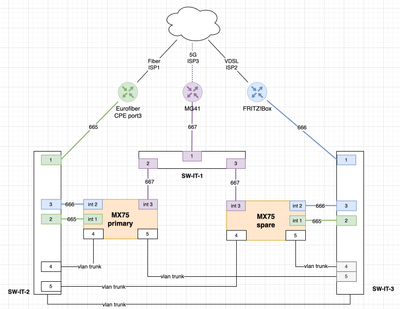
Solved! Go to solution.


- Mark as New
- Bookmark
- Subscribe
- Mute
- Subscribe to RSS Feed
- Permalink
- Report Inappropriate Content
As far as i understand your explanation it works as expected
- Mark as New
- Bookmark
- Subscribe
- Mute
- Subscribe to RSS Feed
- Permalink
- Report Inappropriate Content
As far as i understand your explanation it works as expected
- Mark as New
- Bookmark
- Subscribe
- Mute
- Subscribe to RSS Feed
- Permalink
- Report Inappropriate Content
My bad for not reading the documents thoroughly enough.

- Mark as New
- Bookmark
- Subscribe
- Mute
- Subscribe to RSS Feed
- Permalink
- Report Inappropriate Content
Are you taking into acount the time it needs to detect the failure?
When you unplug the cable on the MX side, it immediately detects link down and can use the other links.
When you unplug the cable on the CPE side then the MX will not detect a link down since it is connected to the switch. You have to wait until the ICMP, HTTP and DNS test start to fail.
I will paste the following sentence of the documentation:
When both the HTTP and ICMP tests have been unsuccessful for a period of time that exceeds 300 seconds, the uplink will be failed over. Therefore, it can take approximately five minutes for failover to occur in the event of a soft failure (where the physical link is still up but provides no internet access).
- Mark as New
- Bookmark
- Subscribe
- Mute
- Subscribe to RSS Feed
- Permalink
- Report Inappropriate Content
I guess I didn't take enough time. My bad for not reading the documents thoroughly enough.
I do think up to 300 seconds is way too long to detect a soft failure, as compared to a hard failure.
- Mark as New
- Bookmark
- Subscribe
- Mute
- Subscribe to RSS Feed
- Permalink
- Report Inappropriate Content
Yes it is a bit long but that is only for the internet tests.
SD-WAN fault detection is much quicker since that uses probes every second between both MX'es in an AutoVPN.
I believe Ryan is referring to the SD-Internet because that is built upon SD-WAN.

- Mark as New
- Bookmark
- Subscribe
- Mute
- Subscribe to RSS Feed
- Permalink
- Report Inappropriate Content
Hello @braham_ilg You are not doing anything wrong , it is just because of the
- Mark as New
- Bookmark
- Subscribe
- Mute
- Subscribe to RSS Feed
- Permalink
- Report Inappropriate Content
The CPE of the main ISP only allows for a single uplink. So I had to go through a switch port to set this as there is a spare MX too.
Setting failover mode to Immediate doesn't help at all, I tested that.


- Mark as New
- Bookmark
- Subscribe
- Mute
- Subscribe to RSS Feed
- Permalink
- Report Inappropriate Content
If you are on the SDW MX license level you can use a SD-Internet policy to speed up soft failure scenarios. I've had pretty good results doing this.
Example, create a SD-Internet policy to failover to WAN 2 if there's loss. This should be detected quickly and move traffic to WAN 2 when the WAN 1 failure is upstream/"soft failure".


-
3rd Party VPN
174 -
ACLs
91 -
Auto VPN
306 -
AWS
36 -
Azure
70 -
Client VPN
383 -
Firewall
868 -
iOS
1 -
Other
557 -
Wireless LAN MR
1
