We're migrating to the Cisco Community on March 29. The Meraki Community will enter read-only mode starting on March 26.
Learn more- Technical Forums
- :
- Security & SD-WAN
- :
- Re: High Latency & Packet Loss on WAN Link – Bandwidth Normal (Meraki MX Ev...
High Latency & Packet Loss on WAN Link – Bandwidth Normal (Meraki MX Evidence)
- Subscribe to RSS Feed
- Mark Topic as New
- Mark Topic as Read
- Float this Topic for Current User
- Bookmark
- Subscribe
- Mute
- Printer Friendly Page

- Mark as New
- Bookmark
- Subscribe
- Mute
- Subscribe to RSS Feed
- Permalink
- Report Inappropriate Content
High Latency & Packet Loss on WAN Link – Bandwidth Normal (Meraki MX Evidence)
Hello Meraki Community,
We are facing intermittent high latency and packet loss on one of our ISP links, and would appreciate your insights.
Environment
Device: Cisco Meraki MX
WAN setup: Dual WAN
Monitoring via: Meraki Dashboard
Latency/Loss test destination: 8.8.8.8
Location: Corporate Office
Issue Description
Meraki MX shows latency spikes reaching several seconds (1000–4000 ms).
Intermittent packet loss (1–5%) observed during the same time window.
Bandwidth utilization is normal on both WAN interfaces and has been verified with the ISPs.
No recent configuration changes, firmware upgrades, or internal network changes.
Issue impacts user experience (slow applications, intermittent disconnects).
Observations
Latency and packet loss occur even when traffic is low.
Alternate WAN link remains stable.
Firewall CPU and memory usage are normal.
This points away from LAN congestion or bandwidth saturation.
Question to Community
Have you seen similar behavior where Meraki MX reports high latency/loss with normal bandwidth usage?
Are there any advanced MX diagnostics or hidden checks we should perform to further validate this?
Any recommendations to conclusively differentiate ISP-side routing/fiber issues vs MX behavior?
Screenshots from the Meraki Dashboard (uplink traffic, latency, and loss graphs) are attached for reference.
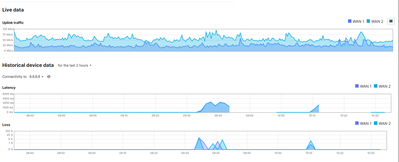
This is a repeating issue
Current version: MX 19.2.4
2 ISP's
Both Bandwidth- 200 mbps (Total 400)


- Mark as New
- Bookmark
- Subscribe
- Mute
- Subscribe to RSS Feed
- Permalink
- Report Inappropriate Content
The information you've provided is enough to point to the ISP as the problem.
To provide evidence, you can collect packet captures on the WAN interface to show the latency, retransmits etc. Just ensure you test to multiple Internet endpoints (which are not aggressive in traffic policing) to prove it's not related to a single destination.
I've done this before to force an ISP to investigate further to which they eventually found the issue on their side.

- Mark as New
- Bookmark
- Subscribe
- Mute
- Subscribe to RSS Feed
- Permalink
- Report Inappropriate Content
I have previously had to investigate an issue where the customer's link was fine, but the ISP itself was experiencing loss to 8.8.8.8
Try adding an extra test target, like 1.1.1.1, and see if it also has the same loss at the same time.

- Mark as New
- Bookmark
- Subscribe
- Mute
- Subscribe to RSS Feed
- Permalink
- Report Inappropriate Content
This ^ !
Here in Canada , we have around 2800 active uplinks with 10 ISP. One of these ISP ( Rogers ) is almost always experiencing loss to 8.8.8.8 1-3%. However if you have AutoVPN ON , just look at the AutoVPN loss. If you don't have AutoVPN loss but have loss to 8.8.8.8 , this is exactly what Phil is refering to.
- Mark as New
- Bookmark
- Subscribe
- Mute
- Subscribe to RSS Feed
- Permalink
- Report Inappropriate Content
Yes, getting same loss at the same time with the extra target i.e 1.1.1.1.

- Mark as New
- Bookmark
- Subscribe
- Mute
- Subscribe to RSS Feed
- Permalink
- Report Inappropriate Content
If you have SDWAN+ or Insight licensing then you can set up app monitors and it also has a WAN health page that shows usage, latency, jitter and more.
- Mark as New
- Bookmark
- Subscribe
- Mute
- Subscribe to RSS Feed
- Permalink
- Report Inappropriate Content
@RaphaelL , @cmr @PhilipDAth @Brash We are facing this issue daily during morning peak hours (between 9:00 AM and 11:00 AM). The problem starts when users begin connecting to the network, after which internet connectivity becomes unstable or intermittently drops.
After this time window, the internet works normally for the rest of the day. We have also tested the setup by running on a single ISP, and there are no issues outside the morning peak period.
- Mark as New
- Bookmark
- Subscribe
- Mute
- Subscribe to RSS Feed
- Permalink
- Report Inappropriate Content
If the issue only happens with a single ISP, then it sounds like the ISP has the issue. I would raise a support ticket with them.
- Mark as New
- Bookmark
- Subscribe
- Mute
- Subscribe to RSS Feed
- Permalink
- Report Inappropriate Content
I would like to clarify that we have tested the setup by running each ISP individually (one at a time) after peak hours, and no issues were observed. Internet connectivity remains stable during non-peak hours on both ISPs.
However, we are consistently facing latency issues during morning peak hours between 9:00 AM and 10:30 AM, when a large number of users start connecting to the network. This issue occurs daily during this specific time window.
Post 10:30 AM, latency normalizes and the internet works fine for the rest of the day.
- Mark as New
- Bookmark
- Subscribe
- Mute
- Subscribe to RSS Feed
- Permalink
- Report Inappropriate Content
To me it sounds like the MX could be getting overloaded. What model is it and how many users do you have?
So they authenticate on premises or to the cloud / over the WAN?
- Mark as New
- Bookmark
- Subscribe
- Mute
- Subscribe to RSS Feed
- Permalink
- Report Inappropriate Content

- Mark as New
- Bookmark
- Subscribe
- Mute
- Subscribe to RSS Feed
- Permalink
- Report Inappropriate Content
This is ringing some bells with me. There was an issue with MX450s related to single- and multi-threading. It is vague in my mind now.
I also recall a related but different issue if it is being used as an AnyConnect concentrator. Is this MX450 also terminating client VPN?
If you are not running a current stable or better firmware, do that first. I recall this issue was fixed.
Also note that 19.2.2 and 19.2.4 fix quite a few MX450 issues. Personally, I think I would jump to 19.2.4.
Otherwise (in desperation), ask support to see if there are any options they can see to disable multi-threading (as a test). There is a process they can control the behaviour of from their side.
This is a low-probability "Hail Mary" type of option.
- Mark as New
- Bookmark
- Subscribe
- Mute
- Subscribe to RSS Feed
- Permalink
- Report Inappropriate Content
You should be okay with that model and those users, but I do see your utilisation going quite high. I do believe that you can get support to monitor the real time load in the morning peak as that may be somewhat higher than the averages shown on the dashboard.

-
3rd Party VPN
174 -
ACLs
91 -
Auto VPN
305 -
AWS
36 -
Azure
70 -
Client VPN
382 -
Firewall
866 -
iOS
1 -
Other
557 -
Wireless LAN MR
1
