We're migrating to the Cisco Community on March 29. The Meraki Community will enter read-only mode starting on March 27.
Learn more- Technical Forums
- :
- Security & SD-WAN
- :
- Re: MX Firewall Log Tool
MX Firewall Log Tool
- Subscribe to RSS Feed
- Mark Topic as New
- Mark Topic as Read
- Float this Topic for Current User
- Bookmark
- Subscribe
- Mute
- Printer Friendly Page


- Mark as New
- Bookmark
- Subscribe
- Mute
- Subscribe to RSS Feed
- Permalink
- Report Inappropriate Content
MX Firewall Log Tool
Just noticed this appear today under the "Tools" section of the MX.

I assume this is what the 18.2 feature addition is.
I'm only running 17.10.6 so probably why I wasn't getting any hits when trying it out.

- Mark as New
- Bookmark
- Subscribe
- Mute
- Subscribe to RSS Feed
- Permalink
- Report Inappropriate Content
Well spotted. Perhaps the next Community contest needs to be spot the unannounced feature @AmyReyes

- Mark as New
- Bookmark
- Subscribe
- Mute
- Subscribe to RSS Feed
- Permalink
- Report Inappropriate Content
Kinda weird that I keep seeing L7 logs when I don't even have any L7 rules enabled
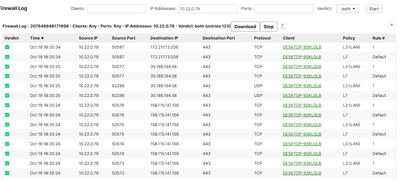
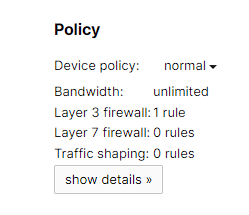
Not perfect but a nice start !
- Mark as New
- Bookmark
- Subscribe
- Mute
- Subscribe to RSS Feed
- Permalink
- Report Inappropriate Content
Well it is documented and expected : https://documentation.meraki.com/MX/Firewall_and_Traffic_Shaping/Firewall_Logging?mt-draft=true#
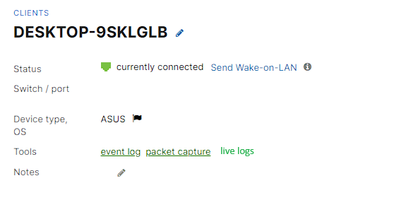
A small addition would be from the Network-wide -> Clients you could directly select a client , press : view live logs and it would redirect to the live tool and fill the clients info for you.
Something like that :
- Mark as New
- Bookmark
- Subscribe
- Mute
- Subscribe to RSS Feed
- Permalink
- Report Inappropriate Content
Yep, I wouldn't call it completely polished but gosh it's nice to have.
I'm guessing the idea is that it will tell you for each flow which L3 and L7 rule you're 'hitting', even if you're not actually hitting one (eg just default in your case). At least it avoids any ambiguity.
Have you already upgraded the above appliance to 18.2?
- Mark as New
- Bookmark
- Subscribe
- Mute
- Subscribe to RSS Feed
- Permalink
- Report Inappropriate Content
Yep running MX18.205 on my home network.
Having a filter for L3/L7 would be cool too !

- Mark as New
- Bookmark
- Subscribe
- Mute
- Subscribe to RSS Feed
- Permalink
- Report Inappropriate Content
Does firewall logging tool shows only outbound traffic? No inbound?


- Mark as New
- Bookmark
- Subscribe
- Mute
- Subscribe to RSS Feed
- Permalink
- Report Inappropriate Content
Yes it requires 18.2 and it shouldn't even show unless a MX is running 18.2. Known issue and being worked on.

- Mark as New
- Bookmark
- Subscribe
- Mute
- Subscribe to RSS Feed
- Permalink
- Report Inappropriate Content
There is nothing in the Meraki document that mentions what the Rule # variables are.
In the document it shows vap:4, what and where is this?
I have one that passes with "group:104". I've looked at Group Policies, not there. What and where is this defined?

- Mark as New
- Bookmark
- Subscribe
- Mute
- Subscribe to RSS Feed
- Permalink
- Report Inappropriate Content
vap:4 would be on a Z or wireless MX SSID, specifically the 4th one.
Groups have IDs that index from 100, so 104 would be your 5th defined policy - if you go to edit one, you'll see groups/###/edit in the URL, and that corresponds to what it will be logged as a source.
- Mark as New
- Bookmark
- Subscribe
- Mute
- Subscribe to RSS Feed
- Permalink
- Report Inappropriate Content
Thanks. Yes, I've found it.
Suggested improvement would be to have Group ID in the Group policies list.

-
3rd Party VPN
174 -
ACLs
91 -
Auto VPN
303 -
AWS
36 -
Azure
70 -
Client VPN
381 -
Firewall
860 -
iOS
1 -
Other
553 -
Wireless LAN MR
1
