Get answers from our community of experts in record time.
Join now- Technical Forums
- :
- Dashboard & Administration
- :
- Re: Login with SSO
Login with SSO
- Subscribe to RSS Feed
- Mark Topic as New
- Mark Topic as Read
- Float this Topic for Current User
- Bookmark
- Subscribe
- Mute
- Printer Friendly Page

- Mark as New
- Bookmark
- Subscribe
- Mute
- Subscribe to RSS Feed
- Permalink
- Report Inappropriate Content
Login with SSO
Maybe I'm completely on the wrong track, but I have connected our Merki to our Azure so that I can log in to the dashboard via SSO.
I used the instructions from here:
https://documentation.meraki.com/General_Administration/Managing_Dashboard_Access/Configuring_SAML_S...
When testing the SSO application, access also works without any problems:
https://learn.microsoft.com/en-us/entra/identity/saas-apps/meraki-dashboard-tutorial#test-sso
However, the question now arises as to whether I really have to make the detour via the Azure portal -> Enterprise apps -> Meraki dashboard every time to log in to the dashboard. Shouldn't it also be possible to log in directly to the dashboard? For example, by simply confirming the already active SSO connection to Microsoft.
I quickly created a picture of how I would have imagined the whole construct.

- Labels:
-
Administrators


- Mark as New
- Bookmark
- Subscribe
- Mute
- Subscribe to RSS Feed
- Permalink
- Report Inappropriate Content
Did you configured a SSO subdomain in the Meraki dashboard? https://documentation.meraki.com/General_Administration/Managing_Dashboard_Access/SP-Initiated_SAML_...
If you do that you can navigate to that URL to login. Something like https://example.sso.meraki.com

- Mark as New
- Bookmark
- Subscribe
- Mute
- Subscribe to RSS Feed
- Permalink
- Report Inappropriate Content
>the question now arises as to whether I really have to make the detour via the Azure portal -> Enterprise apps -> Meraki dashboard every time to log in to the dashboard
Typically, this is how an Idp flow works. The customer goes to their Idp portal, and then clicks on the app then want to access.
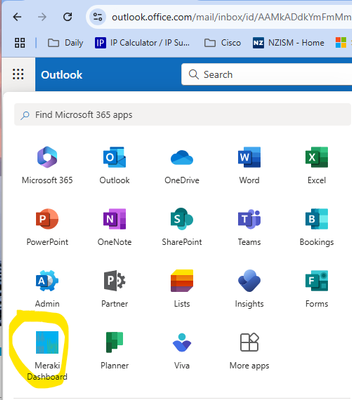
For me personally, I have added it to the app launcher, so it is no more than two clicks away. When I am in any Office 365 web apps (which I live in) I click on the 9 dot launcher, then "Meraki Dashboard" - bam - I'm in the Merak Dashboard all logged in.
If you can get it down to less than 2 mouse clicks let me know.

- Mark as New
- Bookmark
- Subscribe
- Mute
- Subscribe to RSS Feed
- Permalink
- Report Inappropriate Content
In your case, setting up a dedicated SSO subdomain (like example.sso.meraki.com) is definitely the cleaner solution, as Ryan mentioned. It lets users log in directly without needing to navigate through Azure Enterprise Apps every time.
That's how government portals handle similar login flows. In Rajasthan SSO users authenticate once with SSO id and then can directly access various services without always going back through the main dashboard.
- Mark as New
- Bookmark
- Subscribe
- Mute
- Subscribe to RSS Feed
- Permalink
- Report Inappropriate Content
The dedicated SSO subdomain doesn't work that smoothly. You have to go to a special URL associated with the sub-domain, and then log in from there. You can't use it to login from the main login page.

- Mark as New
- Bookmark
- Subscribe
- Mute
- Subscribe to RSS Feed
- Permalink
- Report Inappropriate Content
Isn't this kind of a small gripe? Our subdomain works fine, just have your users bookmark it. In fact, almost all of the enterprise applications I setup do not have the capability of forwarding to SSO from their "main login page," and instead more often than not insist on using a subdomain URL they conveniently provide. Seriously, maybe half a dozen out of the hundreds of enterprise apps I have in my org do this.
What would be more convenient for you? Going to the main login page and typing in your user address, clicking next, having Meraki do some kind of lookup on the back end to determine if your email domain is part of an an SSO organization, then magically prompting SSO? Think about that for a second. If you did this, you would not be able to use email address "break glass" accounts if you needed to bypass SSO and login to your dashboard. There's a reason larger companies do this, and it's for your security that almost all of them use subdomains.

- Mark as New
- Bookmark
- Subscribe
- Mute
- Subscribe to RSS Feed
- Permalink
- Report Inappropriate Content
You do not need to go through Azure Portal → Enterprise Apps → Meraki each time. That path is meant for administrators, not daily users. Your current approach—launching Meraki from the Office 365 9-dot app launcher or My Apps—is exactly how IdP-initiated SSO is designed to work and is already an optimized, supported flow.
If you want even fewer steps, use SP-initiated SSO by bookmarking https://dashboard.meraki.com. If you’re already signed into Azure AD, it becomes a single click straight into the Meraki Dashboard, and with a pinned tab or startup page it can feel like zero friction.
- Mark as New
- Bookmark
- Subscribe
- Mute
- Subscribe to RSS Feed
- Permalink
- Report Inappropriate Content
I never said to log in from the enterprise app. We all know what the enterprise app does. Please re-read what I wrote several times to let it fully “cook.”
The guy sounded upset he had to use the special URL that you setup during the SSO setup. “YourDomain.meraki.com” for example.
Also no…you cannot use SSO from Dashboard.meraki.com. I manage several companies and this does not work at all. For example if I setup SSO for DomainA.com and then I try to login to dashboard.meraki.com with UserA@DomainA.com it does not forward to SSO login or attempt SSO MFA. Instead you have to use DomainA.meraki.com or whatever the SSO login page you created during he SSO setup was. So no, what you’re suggesting does not work.
- Mark as New
- Bookmark
- Subscribe
- Mute
- Subscribe to RSS Feed
- Permalink
- Report Inappropriate Content
Also, how the heck did you interpret what I said as “I’m logging in from Azure > Enterprise Apps > Meraki?”
I literally never said anything remotely similar to this….

-
Administrators
240 -
Change log
15 -
Firmware upgrades
31 -
Inventory
48 -
Licensing
80 -
Meraki mobile app
13 -
Other
177
